Sticky Navbar At The Bottom Of The Header
Scroll down this page and watch the navbar. It is placed at the bottom of the header, and when it reaches the top of the page, the position is changed (using javascript) to "fixed" and it remains in view. That is what I mean when I say the nav is sticky. It scrolls and then "sticks".
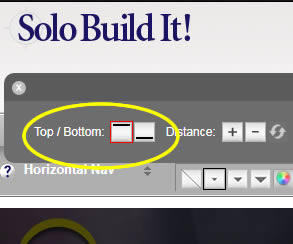
When you select the Horizontal Navbar in S.D, you are given the choice of placing it at the top or bottom of the header (there is no option to make it sticky or fixed - that is what this custom CSS is going to address). When you make your selection, that will create and write the properties/values for the class that controls the positioning.
So, when you are setting up Site Designer, you will want to choose the bottom position for the nav.
This is suitable for anyone that is using, or wants to use the DOG DAYS template, and requires the custom mods that have been performed. I suggest doing these steps EXACTLY as shown, rather than choosing to make various changes of your own as you go. The idea is to end up with an exact copy of what we have on the demo site (with possible exception of your own header and logo), and THEN you can go and add your personal touches to the look and feel.
This column will always be at least 300px wide (plus padding), meaning that it is suitable for MediaVine, or the larger sized Google ads.
Because the column is fixed wider than default, it means that layout looks best if the columns change to tablet/phone layout at a larger size.
So, the breakpoint of 980px is where the columns will become block level and full width, although the top nav will remain as desktop view until the normal width of 768px. At that time, the nav changes to the mobile view button.
Home | About Us | Contact Us | Privacy Policy
Dog Days Template, Demo Custom Version
Copyright © 2019- All Rights Reserved